 The Crosswalk
The Thought Process Behind Fixing Minecraft (Without Touching the Terminal)
A step-by-step troubleshooting guide for Linux users
How to troubleshoot
I ran into an issue with Minecraft where I couldn't open the Minecraft launcher. I wanted to post this in case anyone ran into a similar issue. Scroll down a little bit to see the quick view of the solution. If you're interested in learning how to troubleshoot in linux An alternative to Windows or MacOS on computers. , read the whole post.
In this post, I'll walk through my thought process as if I used only the desktop, and not the terminal a text-based tool where you navigate your system and run commands by typing instead of clicking in a user interface (a text-based tool where you type commands instead of clicking) at all. You'll see an example of troubleshooting a problem step by step.
A game for mom
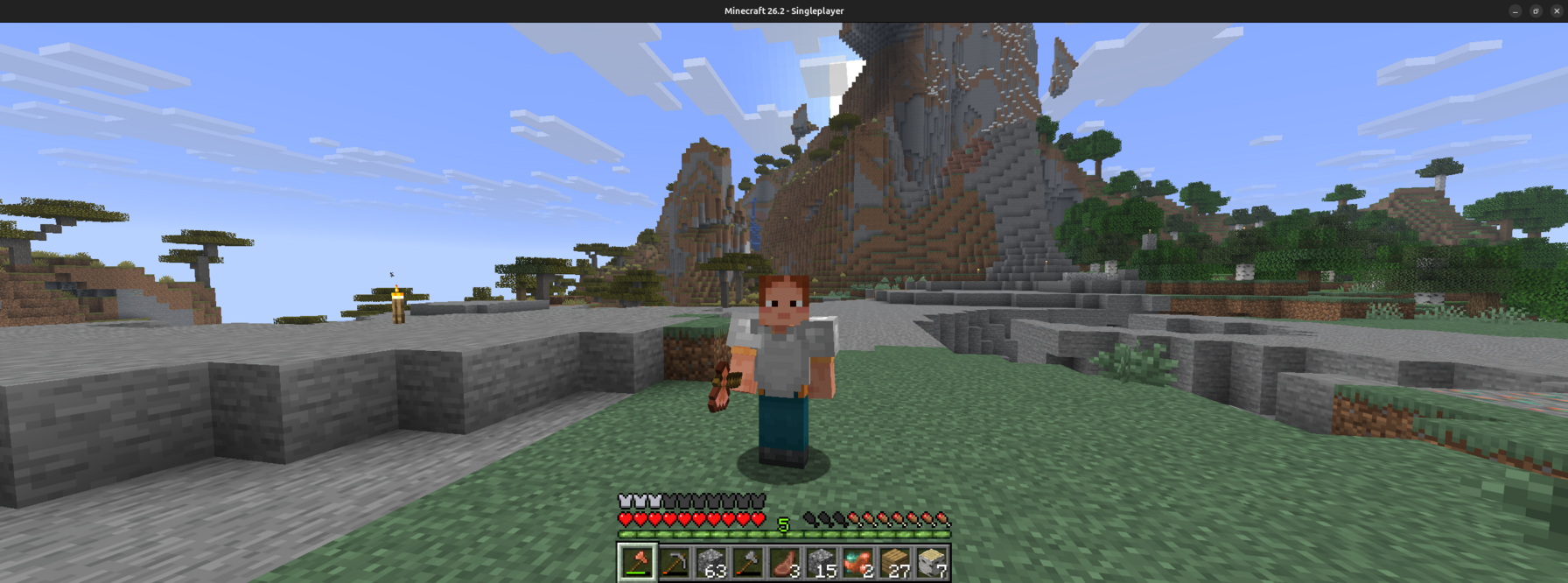
I'm a mom. I love Minecraft. In the rare moments I get to do something for myself, I like to play it. It's easy to save and quit anytime if my little guy wakes up early from nap, or some emergency comes up. If I'm at my base, I can just leave my guy there and walk away.
Although I yearned for the mines during naptime today, I spent some of the time fixing an issue I caused. The thing that took the longest was making screenshots and notes to share with you, so it really wasn't a big deal. If you have a similar issue, you'll have it fixed in no time.
At the risk of starting to sound like a recipe blog telling you my life story when you just want the recipe, I'll leave it at that.
The solution
Quick Fix: If your Minecraft launcher won't open after renaming your computer, try these steps:
-
Open your file manager the program you use to browse, open, and organize files and folders on your computer, like Windows Explorer or Gnome Files on Linux and navigate to
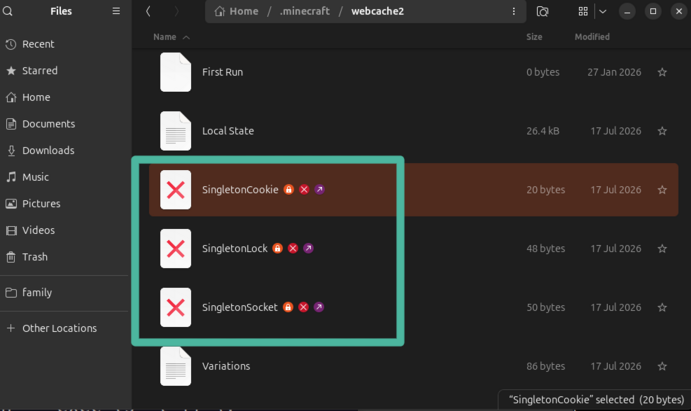
~/.minecraft/webcache2/
(The~symbol means your home folder — where your Documents, Downloads, and other folders live.) -
Look for three files with a red X icon (these are "broken shortcuts" called symlinks a file that acts as a shortcut, pointing to another file or folder somewhere else on the computer )
-
Delete those three files
-
Relaunch Minecraft
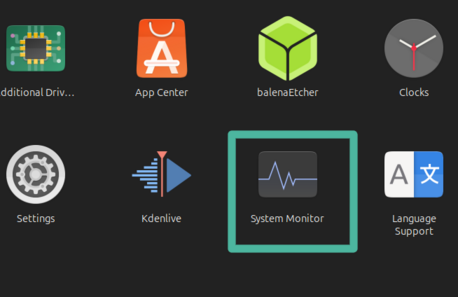
You can make sure that Minecraft launcher isn't running by looking at Gnome's "System Monitor," which is like Windows Task Manager. Use the search icon and type "Minecraft."
The thought process
The general process for troubleshooting this particular issue is down at the bottom. It's detailed, but I want to share a high level here. If you get into the habit of asking yourself these types of questions, and being cautious about anything you do that you're not sure of, you'll realize that you are more capable than you thought.
- Look for clues. Check log log files in a computer are notes where programs record events, messages, warnings, and errors so you can see what happened and when files or error messages the program may have recorded.
- Identify what's broken. What specifically is failing?
- Identify the error text or code.
- Research the error text and the individual terms or pieces in it. Break the error apart. You will know more in there than you think.
- Search for the error text and code in a web search.
- If that doesn't turn up anything, you can ask AI, but BE CAUTIOUS of what it tells you to do, and be skeptical of commands it asks you to run. It can be catastrophically wrong, and make bad things happen to your computer.
- Figure out what caused it
- What changes did you make recently?
- Were any updates pushed to this program or to the system?
- What needs to be backed up? Any files or settings you need to save somewhere else?
- What is the worst that could happen?
Computer name = host name your computer's internal name, used by the system and other devices to identify it on a network
It all started the other day. I didn't like my computer's name, called the host name your computer's internal name, used by the system and other devices to identify it on a network . It's used behind the scenes by your computer and other devices to identify it, like giving your computer a name tag. The name I had was long and weird and I didn't want to look at it anymore, so I changed it. This was after all my things were installed, for example, Minecraft, and I had been using them and all that. After I changed the host name your computer's internal name, used by the system and other devices to identify it on a network , I ran into a problem.
I don't have an image to show you because a small black box popped up and went away. At first I thought, "Oh, I must've not actually clicked to open," because I had received a text and turned to look at that.
Minecraft launcher wouldn't open
The Minecraft Launcher program that you use to select your game and version and all that wouldn't load and it didn't provide an error message. So I had NO idea what the problem was.
Check the log log files in a computer are notes where programs record events, messages, warnings, and errors so you can see what happened and when file
When I tried to open Minecraft launcher and it didn't open, the program recorded an error in a
log
log files in a computer are notes where programs record events, messages, warnings, and errors so you can see what happened and when
somewhere. The
log
log files in a computer are notes where programs record events, messages, warnings, and errors so you can see what happened and when
you might want to check for is HOME/.minecraft/launcher_cef_log.txt
I use HOME to refer to your
home directory
the main folder assigned to your user account, where your Documents, Downloads, and other personal folders live. Often shown as the tilde symbol (~)
, sometimes also shown as a tilde ~
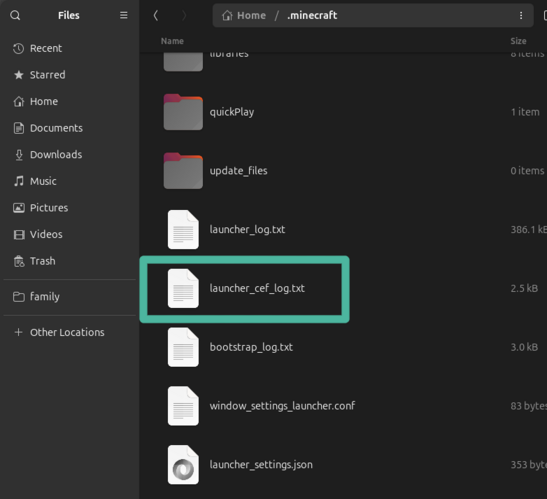
I wasn't sure where to look, but I know many applications and games will have a log log files in a computer are notes where programs record events, messages, warnings, and errors so you can see what happened and when file that keeps messages and errors saved in text. I checked with the terminal a text-based tool where you navigate your system and run commands by typing instead of clicking in a user interface , but I assume an online search would've told me what the log log files in a computer are notes where programs record events, messages, warnings, and errors so you can see what happened and when file name is. If I wanted to know without using the terminal a text-based tool where you navigate your system and run commands by typing instead of clicking in a user interface , I would've searched online for "Minecraft log log files in a computer are notes where programs record events, messages, warnings, and errors so you can see what happened and when file name location"
The other clue would be the timestamp a date and time stamped on a log entry or file, so you know exactly when something happened , which is the date and time together, attached to each log log files in a computer are notes where programs record events, messages, warnings, and errors so you can see what happened and when entry and file. If I looked at the files with the words "launcher" and " log log files in a computer are notes where programs record events, messages, warnings, and errors so you can see what happened and when ," I could look for one updated at the time I tried to open Minecraft. Inside the logs, each entry should be timestamped. I knew when I tried to open the program, so there's probably at least one error entry for that time.
Hidden files files and folders that your system hides by default, usually to keep important system files out of the way
If you're not familiar with
hidden files
files and folders that your system hides by default, usually to keep important system files out of the way
, here is a short paragraph. Every
operating system
The core software that manages a computer and lets applications run. This would be Windows or MacOS on computers, Android or iOS for phones, for example.
has
hidden files
files and folders that your system hides by default, usually to keep important system files out of the way
. The error message we're talking about today appeared in a text file in the .minecraft folder, notice the dot . in the name.
Linux
An alternative to Windows or MacOS on computers.
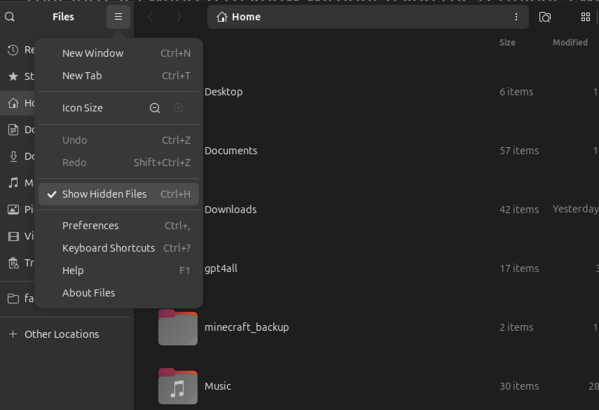
will treat files that start with a dot as hidden, and the following image shows what the
hamburger menu
a menu button that looks like three horizontal lines stacked on top of each other, like a hamburger
looks like to turn on 'Show
Hidden Files
files and folders that your system hides by default, usually to keep important system files out of the way
.'
Error message
The error message gave me a hint. It mentioned a "
Chromium
Chromium is an open source project that is used in many web browsers, and in their words, 'aims to build a safer, faster, and more stable way for users to experience the web.'
process" locked, and mentions a
profile
settings and data that belong to one user or session
. The part that made me go "AHA!" was, "The
profile
settings and data that belong to one user or session
appears to be in use by another
Chromium
Chromium is an open source project that is used in many web browsers, and in their words, 'aims to build a safer, faster, and more stable way for users to experience the web.'
process (23360) on another computer (
The message
<me:

  host name
  your computer's internal name, used by the system and other devices to identify it on a network

>
:~$ minecraft-launcher
[<numbers>:ERROR:process_singleton_posix.cc(<number>)]
The
profile
settings and data that belong to one user or session
appears to be in use by another
Chromium
Chromium is an open source project that is used in many web browsers, and in their words, 'aims to build a safer, faster, and more stable way for users to experience the web.'
process
(23360) on another computer (<number>).
Chromium
Chromium is an open source project that is used in many web browsers, and in their words, 'aims to build a safer, faster, and more stable way for users to experience the web.'
has locked
the
profile
settings and data that belong to one user or session
so that it doesn't get corrupted. If you are sure
no other processes are using this
profile
settings and data that belong to one user or session
, you can unlock the
profile
settings and data that belong to one user or session
and relaunch
Chromium
Chromium is an open source project that is used in many web browsers, and in their words, 'aims to build a safer, faster, and more stable way for users to experience the web.'
.
[<numbers>:ERROR:message_box_dialog.cc(<number>)]
Unable to show a dialog outside the UI thread message loop:
Chromium
Chromium is an open source project that is used in many web browsers, and in their words, 'aims to build a safer, faster, and more stable way for users to experience the web.'
- The
profile
settings and data that belong to one user or session
appears to be in use by another
Chromium
Chromium is an open source project that is used in many web browsers, and in their words, 'aims to build a safer, faster, and more stable way for users to experience the web.'
process (23360) on another computer
(<old
host name
your computer's internal name, used by the system and other devices to identify it on a network
>).
Chromium
Chromium is an open source project that is used in many web browsers, and in their words, 'aims to build a safer, faster, and more stable way for users to experience the web.'
has locked the
profile
settings and data that belong to one user or session
so that it
doesn't get corrupted. If you are sure no other processes are
using this
profile
settings and data that belong to one user or session
, you can unlock the
profile
settings and data that belong to one user or session
and relaunch
Chromium
Chromium is an open source project that is used in many web browsers, and in their words, 'aims to build a safer, faster, and more stable way for users to experience the web.'
.
[<numbers>:ERROR:main_runner.cc(<number>)]
ContentMainRun failed with
exit code
a mini error report: a number a program gives when it finishes running (zero usually means success)
21
Technical jargon
Unable to show a dialog outside the UI thread message loop basically is a technical jargon way of describing what I saw. I didn't get a pop up window telling me what happened. It tried to pop up something, but couldn't really do that.
Exit code a mini error report: a number a program gives when it finishes running (zero usually means success)
Sometimes looking up an
exit code
a mini error report: a number a program gives when it finishes running (zero usually means success)
will be really helpful to tell you what happened, but you need to know what returned (what gave you) that code. I know it came from ContentMainRun but I don't know where that is or what it does exactly. I focused on the "aha" moment instead.
Process ID a number assigned to each running program, so you can identify it, like a name tag for a program while it's running
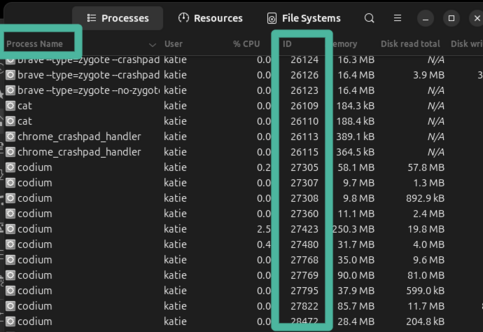
As an aside, that 23360 is a process ID a number assigned to each running program, so you can identify it, like a name tag for a program while it's running that helps you identify which program is running. The below image shows you where you can find it in the System Monitor program. The process ID a number assigned to each running program, so you can identify it, like a name tag for a program while it's running it mentioned didn't exist.
Chromium Chromium is an open source project that is used in many web browsers, and in their words, 'aims to build a safer, faster, and more stable way for users to experience the web.'
This error message mentions Chromium Chromium is an open source project that is used in many web browsers, and in their words, 'aims to build a safer, faster, and more stable way for users to experience the web.' . Chromium Chromium is an open source project that is used in many web browsers, and in their words, 'aims to build a safer, faster, and more stable way for users to experience the web.' is an open source Software whose code is publicly available and modifiable. Transparency, collaboration, and often free as in free lunch are important parts of the open source model. project that powers many web browsers, including Google Chrome. You can think of it as the engine behind a lot of apps that display web content (chromium.org).
The CEF short for Chromium Embedded Framework, a way for apps to use Chromium's web engine inside their own program, without needing a separate browser in the log log files in a computer are notes where programs record events, messages, warnings, and errors so you can see what happened and when file is related to this. CEF short for Chromium Embedded Framework, a way for apps to use Chromium's web engine inside their own program, without needing a separate browser = Chromium Chromium is an open source project that is used in many web browsers, and in their words, 'aims to build a safer, faster, and more stable way for users to experience the web.' Embedded Framework. Minecraft launcher uses this engine instead of building something from scratch.
Electron the Electron project is an open source effort to build cross-platform desktop apps using web languages so you don't need a new program version for each system
The Minecraft launcher is built on
Electron
the Electron project is an open source effort to build cross-platform desktop apps using web languages so you don't need a new program version for each system
, which bundles
Chromium
Chromium is an open source project that is used in many web browsers, and in their words, 'aims to build a safer, faster, and more stable way for users to experience the web.'
.
Electron
the Electron project is an open source effort to build cross-platform desktop apps using web languages so you don't need a new program version for each system
makes it easier for apps to work on different types of computers. It handles things like installers and updates so the app
developer
a person who writes software and apps
doesn't have to build a separate version for each
operating system
The core software that manages a computer and lets applications run. This would be Windows or MacOS on computers, Android or iOS for phones, for example.
. If you know you know. Building one program is much easier than building three separate ones in different languages or with different considerations based on the
operating system
The core software that manages a computer and lets applications run. This would be Windows or MacOS on computers, Android or iOS for phones, for example.
.
Electron project website
When I got stuck
I wasn't sure where to look next. My searches didn't turn up anything helpful at all. So I went to AI to ask for help. I'm comfortable enough with the terminal a text-based tool where you navigate your system and run commands by typing instead of clicking in a user interface and how Linux An alternative to Windows or MacOS on computers. works to know whether a command is safe to run or file safe to delete.
I described the error message to an AI assistant, and it suggested that some cached files might be causing the problem. But before running any commands, I checked to make sure I understood what they would do.
It told me the exact 3 files that were the issue. They're called "singleton" because they have something to do with making sure there's only one instance of an instance of a program is one running copy of it. You can have multiple instances of the same program running at the same time, like opening two browser windows the Minecraft Launcher (only one running copy). It could be referring to Minecraft rather than the launcher. Or maybe both. I'm not sure.
Deleting these files fixed the issue and I was able to play Minecraft. In the next few sections, I'll explain why I felt they were safe to delete.
Symlinks a file that acts as a shortcut, pointing to another file or folder somewhere else on the computer
Notice the red X on the file icons in the image above. These files are in a folder called webcache2, and they are files that are not actually in the folder we're looking at. They are
  symbolic links
  a file that acts as a shortcut, pointing to another file or folder somewhere else on the computer
, and we can confirm that if we click to view the
file properties
details about a file, such as its size, type, when it was created or last changed, and (for links) where it points
.
"Link Target" is what tells you that this is a link, and where it points to.
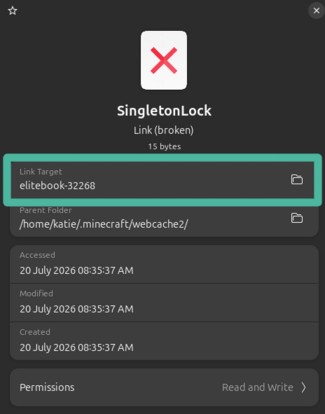
A symbolic link, symlink, is like a shortcut. It looks like a file is in one place, but it's actually pointing to a file somewhere else. The file might appear to be in two places, but it's not a copy. It's ONE file that the link points to.
The red X meant the original file is gone and these symbolic links a file that acts as a shortcut, pointing to another file or folder somewhere else on the computer are broken, they're pointing to a location that doesn't exist.
It's likely that I had played Minecraft, run my commands to rename my computer, and not had a reboot restarting a computer, as in, 'have you tried turning it off and on again?' or shut down in-between the two actions. The error may not have even happened if I had done a restart or shut down between playing Minecraft and renaming the computer.
Worst case would've been to uninstall and reinstall Minecraft launcher
When troubleshooting, it's best to weigh your options by thinking about what you want to happen, and what the worst case scenario is.
If I didn't feel comfortable with whatever fix, or felt like it would've been faster, I would've just uninstalled and reinstalled the game. This is often a way to fix things, and it would've fixed this issue.
In this particular case, I wanted to keep my worlds and not have to do a reinstall. I felt like reinstall would take longer, and I was right. All I had to do was delete the 3 files, which is very fast.
Before deleting anything, I backed up my world saves. That way, even if deleting those files made things worse, I hadn't lost anything important. Always back up your files before trying a fix like this. In fact, just back up your files anyway!
For this, I backed up my .minecraft/saves directory in my home folder as a folder called minecraft_backup.
So there you have it, I hope you learned something about troubleshooting. You can save yourself a lot of headache if you think through the steps of a problem and make sure you know what will happen with each action you take.
The steps I did here are the following:
- I checked the log log files in a computer are notes where programs record events, messages, warnings, and errors so you can see what happened and when .
- I backed up important data.
- I did an internet search using the error message text from the
log
log files in a computer are notes where programs record events, messages, warnings, and errors so you can see what happened and when
that I thought was important, and "Minecraft won't open"
- Search term: Minecraft won't open Chromium Chromium is an open source project that is used in many web browsers, and in their words, 'aims to build a safer, faster, and more stable way for users to experience the web.' - The profile settings and data that belong to one user or session appears to be in use by another Chromium Chromium is an open source project that is used in many web browsers, and in their words, 'aims to build a safer, faster, and more stable way for users to experience the web.' process (23360) on another computer
- I asked AI chat for help, since it's free. I caution anyone on using AI for troubleshooting or running code or commands. If you don't already know how to code, it can cause you a lot of trouble and headaches.
- I described the problem
- I gave it redacted error text.
- I read the response - it wants us to delete some files.
- I asked what the files are and their purpose.
- I asked what happens if I delete the files.
- I ask if there will be unintended consequences from deleting the files.
- I asked what will go wrong if I delete the files.
- I searched what the files are that it wants us to delete.
- I thought about what I wanted to happen.
- keep worlds
- no reinstall
- I thought about worst case scenarios.
- reinstall - no big deal
- possibly lose worlds - no big deal for me, just a little bummer
- I deleted the files.
- I opened the Minecraft Launcher, and then started Minecraft. Success! Hooray!

About Katie B
I'm a mom and a programmer in the mid-Atlantic region of the USA. I like reading, games, hiking.
📬 Join the Newsletter
Get thoughtful writing and practical tips delivered to your inbox. No spam, just meaningful content. Make sure to check your e-mail (and maybe your spam/junk folder) for an e-mail to confirm your subscription!
Frequently asked questions
What are important steps in troubleshooting?
Troubleshooting is a skill that can be developed. Often, you'll have some kind of error message, you need to find out what it means, where the problem came from, and you can search the error online. Learn what the pieces of the error mean. Often nowadays we have to ask AI chat. If you get some hints or direction there, you can often go back to a search engine to find an answer from a reliable source to confirm what it tells you. Think about what you want to happen by fixing the error, files you need to back up, and what the worst case scenario is.
Why won't my Minecraft launcher open after changing my computer name?
Changing your hostname can cause broken symlinks in the `.minecraft/webcache2/` directory that lock the profile. Delete the three broken symlink files in that folder to resolve the issue.
What should I do before deleting any Minecraft files?
Always back up your .minecraft/saves directory first to preserve your world data before attempting any fixes.
Where can I find the Minecraft launcher error logs?
Check ~/.minecraft/launcher_cef_log.txt for detailed error messages about launcher issues.