 The Crosswalk
But What IS Linux, Really?
A plain-language introduction to Linux for non-technical people who want more privacy and control.
You might hear about Linux An alternative to Windows or MacOS on computers. and wonder what it actually is when people say they "use Linux An alternative to Windows or MacOS on computers. " instead of Windows or a Mac.
Let's start with something familiar
When you turn on a computer (or a phone!), you're in an operating system The core software that manages a computer and lets applications run. This would be Windows or MacOS on computers, Android or iOS for phones, for example. . The operating system The core software that manages a computer and lets applications run. This would be Windows or MacOS on computers, Android or iOS for phones, for example. has a lot of different pieces that work together so you can get your work done. You don't need to know what the pieces are to use Linux An alternative to Windows or MacOS on computers. , but you may likely end up learning a little bit about some of them along the way if you stick around.
A lot of people have a Windows computer. There are also Apple computers with their own operating system The core software that manages a computer and lets applications run. This would be Windows or MacOS on computers, Android or iOS for phones, for example. on them. Remember those "I'm a mac. I'm a PC." commercials? Those are two different operating systems.
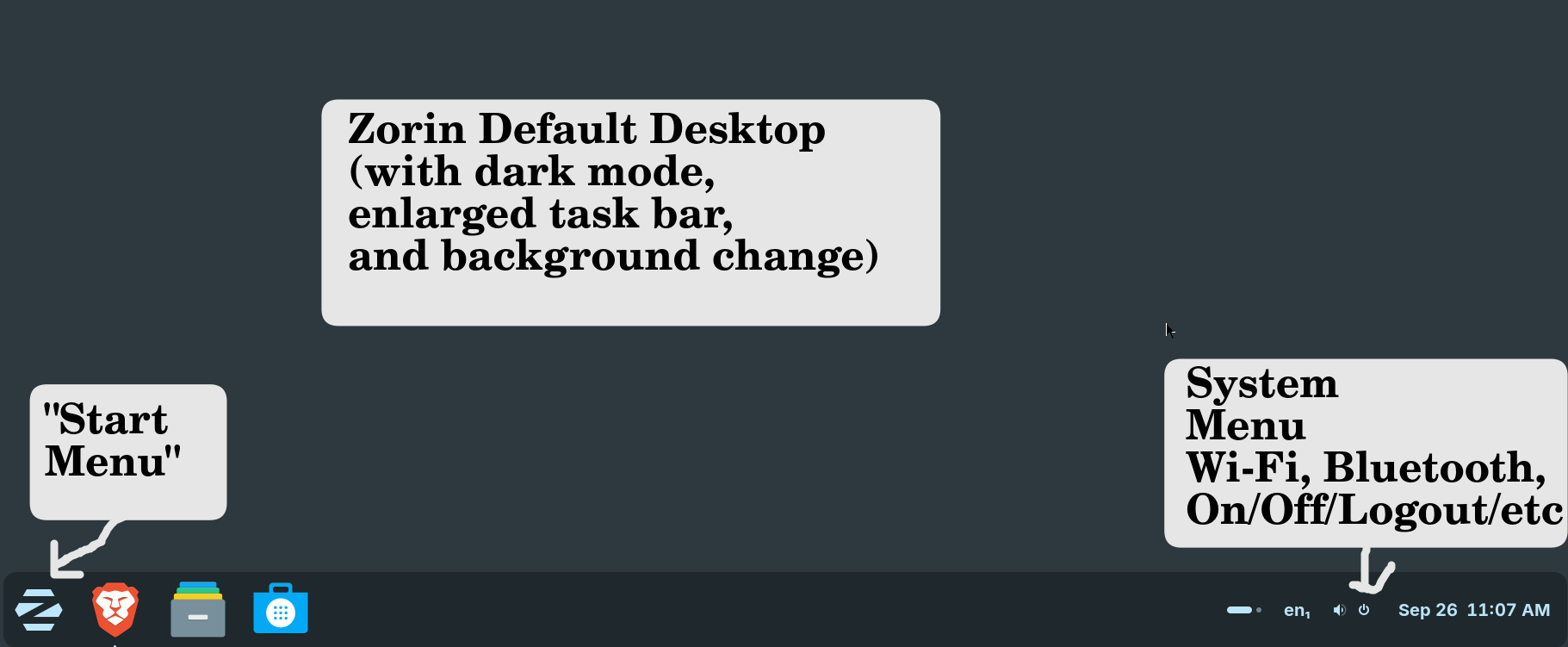
The default desktop in Zorin might look pretty familiar:
It's a Linux An alternative to Windows or MacOS on computers. distro Bundles the Linux kernel with other software components for a complete operating system called Zorin! Notice there are no ads in sight. Big tech isn't using it to spy on me. It doesn't mean I can't be tracked at all, but it helps keep creeps out of my files and away from the photos of my family. It's about having control over your computer. I have nothing to hide; I value my privacy.
Everyone can benefit from Linux An alternative to Windows or MacOS on computers.
A lot of videos and discussions on Linux An alternative to Windows or MacOS on computers. seem to be technical, or geared toward technical people, but you don't need to be technical to benefit from Linux An alternative to Windows or MacOS on computers. . It is more secure and private than most of what's available off the shelf at the store.
This blog is to bring Linux An alternative to Windows or MacOS on computers. to non-technical people who might not have heard of Linux An alternative to Windows or MacOS on computers. , or maybe you've only heard your techie friend talk about it, and maybe they like to tinker, so you feel like Linux An alternative to Windows or MacOS on computers. might not be for you. But I think that's wrong. I think it's for everyone! Not only that, but it can feel so much easier than the mainstream alternatives.
Fighting your computer?
The appeal of Linux An alternative to Windows or MacOS on computers. for me came early, but I didn't make the switch at home until a lot of headaches. I fought with my computers my whole life. I had Windows computers for many years. I knew and used a lot of macs too. I tried getting into the iPhones after I had an iTouch that I liked. But Apple lost my trust pretty quickly. Windows was always a fight: An update makes my camera stop working (and I continually had to fix it because it would get reset automatically), an update resets my settings, my files disappear from the cloud, ever-changing terms of service mean my activity is tracked in ways I don't like... I could go on.
In my experience with Windows, there have been a lot of frustrations. I've had laptops with incompatible hardware out of the box. I've had updates disable my camera. I've had Windows updates brick my computer where I lost data. I've had files just disappear in the cloud. There's the frustration of searching "where did Windows save this file?" And then all the data collection, the ads on the desktop and task bar, configurations reset on updates, and so on.
Windows was bad so Linux An alternative to Windows or MacOS on computers. must be worse?
I thought that Windows was a miserable experience, so Linux An alternative to Windows or MacOS on computers. might be too. I worked with ubuntu server and Red Hat Linux An alternative to Windows or MacOS on computers. for work. I had only experienced Linux An alternative to Windows or MacOS on computers. on the terminal a text-based tool where you navigate your system and run commands by typing instead of clicking in a user interface , which was fine for me, and I like that.
The terminal a text-based tool where you navigate your system and run commands by typing instead of clicking in a user interface is that black box with a command line where you type to interact rather than clicking in a user interface everything about a program that you can see and interact with .
Oh, Linux An alternative to Windows or MacOS on computers. is better!
I thought Linux An alternative to Windows or MacOS on computers. might be a fight like Windows was, but I was wrong! There can be issues depending on your computer, but I haven't run into any issues that would be a big deal for people, except the printer and OneDrive cloud storage auto backup. There are solutions to make both tolerable.
Non-technical tech talk
Occasionally, you'll come across discussions that devolve into arguments about what things are "uh- actually" called, and if you don't care about that, don't sweat it. This isn't a class. I'm not going to grade you. I just want to help you have more privacy, security, and a better experience with your tech.
People make Linux sound more complicated than it is. There's the kernel and the distro. Linux An alternative to Windows or MacOS on computers. itself is the " kernel a low-level, core piece of software on a computer that controls fundamental tasks ," which is something that talks to the hardware and does a few critical things. What you hear most about are the different distros Bundles the Linux kernel with other software components for a complete operating system , distributions, of Linux An alternative to Windows or MacOS on computers. , which means the kernel a low-level, core piece of software on a computer that controls fundamental tasks is packaged up with all the other things you need for an operating system The core software that manages a computer and lets applications run. This would be Windows or MacOS on computers, Android or iOS for phones, for example. . And to add to that, Linux An alternative to Windows or MacOS on computers. was typically packaged with GNU software, and some people would say you should call it GNU/ Linux An alternative to Windows or MacOS on computers. rather than just Linux An alternative to Windows or MacOS on computers. . I won't get on your case about it, but I do want to give them a shout out since we're close to the anniversary of when the GNU project was announced (Sept 27) and that project is a source of good in the world.
Conclusion
Linux An alternative to Windows or MacOS on computers. is like working in a different environment than Windows, and there are some things you'd need to get used to that are a little different. However! It's really not as alien as you might think, and it can be a much better experience than what big tech has to offer.
If you're intrigued, I invite you to test out Linux for yourself without installing it.
And always make sure to back up files that are important to you. That's whether you're testing or using Linux An alternative to Windows or MacOS on computers. or not. Having my own backups that I control gives me peace of mind.
What different distros Bundles the Linux kernel with other software components for a complete operating system look like
Check out my distro Bundles the Linux kernel with other software components for a complete operating system tours that I've posted about. These include many screenshots to show you exactly what you'd be getting.
- Zorin OS - look and feel of Windows
- Pop_OS! - good for gaming
- elementaryOS - looks like Mac
- Mint Cinnamon - beginner-friendly with lots of online resources for troubleshooting and community support
- Mint xfce - beginner-friendly with a desktop type meant to be lightweight for old hardware
If you're not ready to try Linux An alternative to Windows or MacOS on computers. yet
There are a lot of easy things you can do to protect your privacy, to cut down on ads and dangerous pop ups, and to improve your experience with tech. You can use a different search engine, use a privacy-respecting browser Lets you visit pages on the internet, examples are Safari, Edge, Firefox, or Brave. , and check the permissions you're allowing on your computer and phone.
Search engine swap
- DuckDuckGo - has a private AI chat also
- Brave search - has a private AI chat also
- Qwant
There are other things you might want to start with. Maybe you switch your search engine from Google to DuckDuckGo or Brave search. I heard about Qwant because I get search traffic from there. It seems like a really good option. I tend to default to Brave search because I have used the Brave browser Lets you visit pages on the internet, examples are Safari, Edge, Firefox, or Brave. for a long time. I have a lot of experience using DuckDuckGo, but that was more when it was new and I started using Firefox, so it was a while ago! I started using it again recently to test out a browser Lets you visit pages on the internet, examples are Safari, Edge, Firefox, or Brave. called LibreWolf that I've seen recommended online.
Browser Lets you visit pages on the internet, examples are Safari, Edge, Firefox, or Brave. swap
The way you search the web is through a browser Lets you visit pages on the internet, examples are Safari, Edge, Firefox, or Brave. . When you "go to the internet," you are usually using a browser Lets you visit pages on the internet, examples are Safari, Edge, Firefox, or Brave. . I hear things like "I just click on the blue E" or "the swirl." A lot of people use Google Chrome, and it's slick. Lots of extensions. However, it's too slow and resource heavy for me, and it tracks everything you do.
Brave and Firefox also support a lot of great extensions, and they've been fast for me. I have used Brave for years, and before that, my default was Firefox for years. I have a lot of personal experience with Chrome, but it's definitely not my default. I have had many years of raging at using Microsoft Edge as required for work.
Picking a browser that respects your privacy
Check your app permissions
Is your browser Lets you visit pages on the internet, examples are Safari, Edge, Firefox, or Brave. or calculator app asking you for permission to your microphone? In your phone or computer, go to "Settings" and you can usually search for "microphone," "camera," "bluetooth," and "network" permissions.
A calculator or flashlight app shouldn't be asking for connection to your internet or Wi-Fi. That is typically called "network permission." Calculator probably doesn't need access to "sensors," in fact, I deny that permission to literally every app on my phone.
In your app settings you can usually see a list of permissions and the apps with those permissions. Disable "contacts" to apps that don't need them anymore. Disable "microphone" for something that shouldn't need it. Who is looking at your photos? That can be included in the permission to your storage or files.
Related Posts
elementaryOS: Mac Look, Zero Apple
A screenshot-heavy introduction to elementaryOS Linux: what the boot process, desktop, and customization options look like, including dark mode, text sizing, and a built-in dyslexia-friendly font.
Why Everyone Makes Linux Sound More Complicated Than It Is: Kernel vs. Distro
New to Linux and confused by terms like kernel and distro? Here's a plain-language breakdown, plus why Zorin OS and Linux Mint are solid picks for regular people and parents.
How to Automatically Save Version History in LibreOffice on Linux
Discover how to enable automatic version history in LibreOffice Writer on Linux by connecting Google Drive via GNOME Online Accounts. A practical guide for avoiding file loss and managing drafts without complex setups.

About Katie B
I'm a mom and a programmer in the mid-Atlantic region of the USA. I like reading, games, hiking.
📬 Join the Newsletter
Get thoughtful writing and practical tips delivered to your inbox. No spam, just meaningful content. Make sure to check your e-mail (and maybe your spam/junk folder) for an e-mail to confirm your subscription!
Frequently asked questions
What is Linux?
Often when people say they use Linux, they mean their computer is not using Windows or MacOS. Linux is a kernel, meaning the core part of an operating system that talks to your hardware, that gets packaged with other software into a complete operating system called a distribution, or 'distro,' such as Ubuntu, Zorin, and Red Hat.
Do I need to be technical to use Linux?
No, but it can help if you run into an issue. While a lot of Linux content online is aimed at technical users, modern Linux distros like Zorin offer familiar desktop experiences that anyone comfortable with Windows or macOS can pick up.
Is Linux more private than Windows or macOS?
Generally, yes. Linux isn't run by a big tech company, doesn't serve ads, doesn't take screen shots of your activity, and gives you control over your computer, which makes it harder for companies to track you. It doesn't make you completely untraceable, but it is a huge huge improvement over Windows.