 The Crosswalk
How to Install and Set Up LibreOffice (Free Office Suite)
Save money and protect your privacy without sacrificing convenience
In this post, I want to talk a little about how to install LibreOffice. You have some choices in Linux An alternative to Windows or MacOS on computers. .
LibreOffice is also available on Windows and Mac.
LibreOffice's install instructions for Linux, macOS, and Windows
Pre-installed
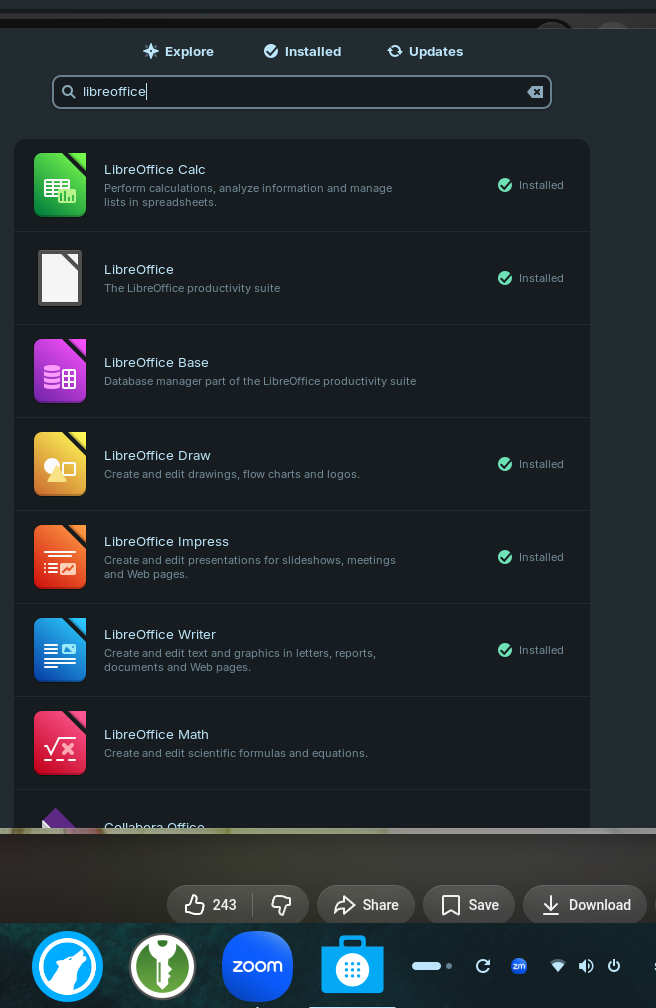
Some Linux An alternative to Windows or MacOS on computers. distros Bundles the Linux kernel with other software components for a complete operating system come with LibreOffice pre-installed. You'll find it in the App Center or "Software" app and be able to update it there.
Linux An alternative to Windows or MacOS on computers. app center or "software" center
You can often get LibreOffice from your distro Bundles the Linux kernel with other software components for a complete operating system 's app center if it doesn't come pre-installed. You may see "Canonical" as the distributor of the package, or "The Document Foundation." Those are expected and fine to download from.
Linux An alternative to Windows or MacOS on computers. terminal a text-based tool where you navigate your system and run commands by typing instead of clicking in a user interface
If you like using the terminal a text-based tool where you navigate your system and run commands by typing instead of clicking in a user interface , you can do it there, too.
Download from the website
Another option is to download it from the website where you'll likely get the very latest version.
Which one?
None of these are wrong. Pick what works best for you. Make sure to keep it up to date.
If you're not technical or tend to utter an "oh I don't know about that" when presented with computer stuff, go with the App Center or "Software" center in your Linux An alternative to Windows or MacOS on computers. distro Bundles the Linux kernel with other software components for a complete operating system .
The Microsoft Store also has it. I'd give you more details about how to get it on your Apple computer, but I'm too far removed from them.
How to check for updates
If you installed via an app store or on the terminal a text-based tool where you navigate your system and run commands by typing instead of clicking in a user interface , you may not see any "check for updates" in menus in LibreOffice. You'll have to go to where you installed it for updates.
Conclusion
Setting up LibreOffice is simple and easy, and it's probably one of the easiest things you can do to improve your privacy and security. You benefit as soon as you hit install and it doesn't cost you a dime!
If you download it, your next step might be to make it look and feel like Microsoft Office.
Related Posts
Alternative to Office: Microsoft Excel Formulas Using LibreOffice Calc
Test 20+ common Excel formulas in LibreOffice Calc and see identical results. Learn which formulas work perfectly, what doesn't translate, and how switching saves you $100+ per year without losing compatibility and without having to overcome a large learning curve.
LibreOffice Is the Free, Private Office Suite You Should Be Using Instead of Microsoft 365
LibreOffice is a free and open source office suite that replaces Word, Excel, and PowerPoint without subscriptions or data harvesting. Learn how to get started and customize it.
How to Automatically Save Version History in LibreOffice on Linux
Discover how to enable automatic version history in LibreOffice Writer on Linux by connecting Google Drive via GNOME Online Accounts. A practical guide for avoiding file loss and managing drafts without complex setups.

About Katie B
I'm a mom and a programmer in the mid-Atlantic region of the USA. I like reading, games, hiking.
📬 Join the Newsletter
Get thoughtful writing and practical tips delivered to your inbox. No spam, just meaningful content. Make sure to check your e-mail (and maybe your spam/junk folder) for an e-mail to confirm your subscription!
Frequently asked questions
Is LibreOffice really free?
Yes, LibreOffice is completely free and open source. There are no hidden costs or subscription fees.
Can I use LibreOffice on Windows and Mac?
Yes, LibreOffice is available for Linux, Windows, and macOS. You can download it from the official website or your system's app store.
Do I need technical skills to install LibreOffice?
Not at all. Non-technical users should use their Linux distro's App Center or Software Center for the easiest installation process.