 The Crosswalk
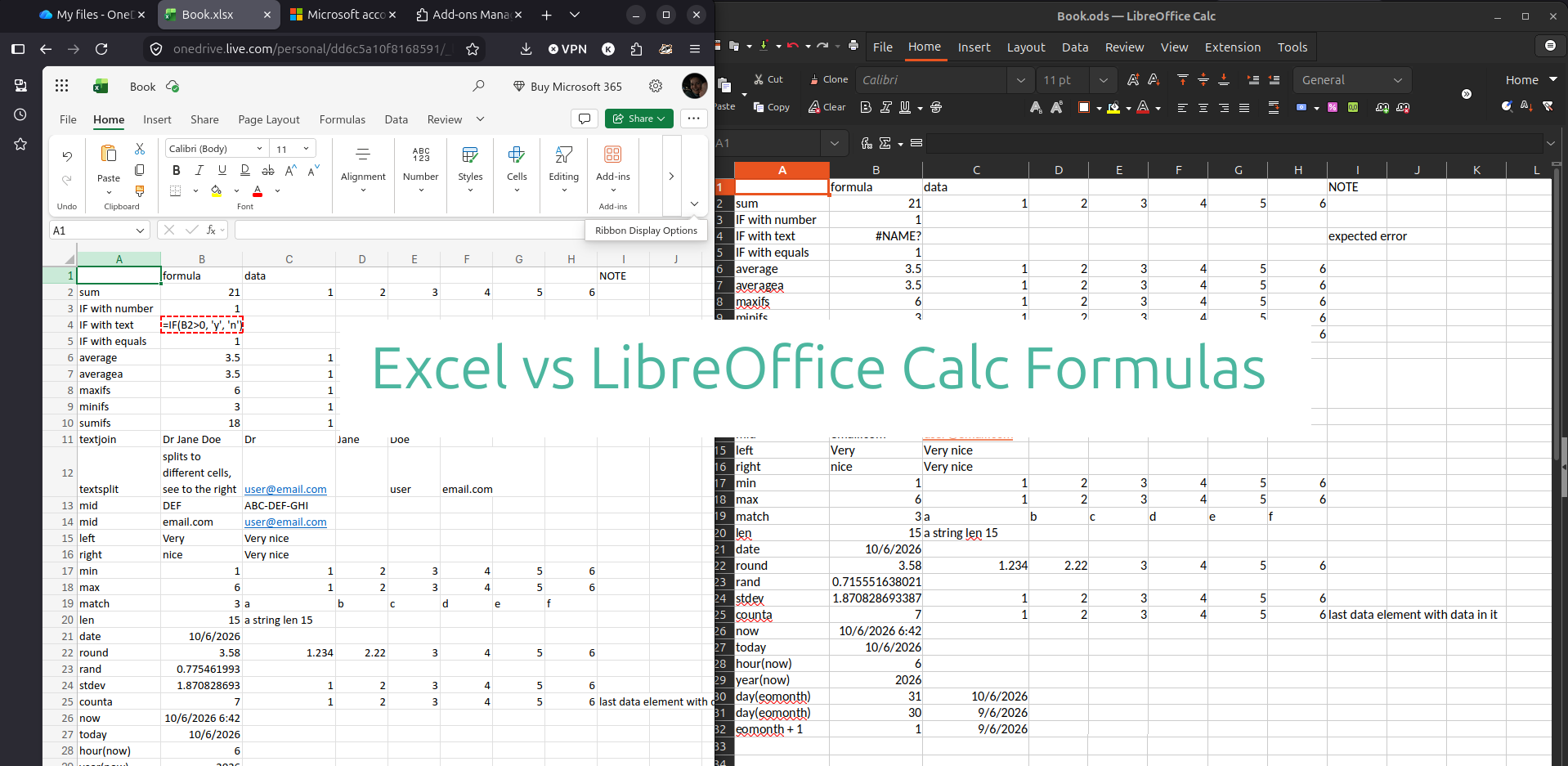
Alternative to Office: Microsoft Excel Formulas Using LibreOffice Calc
Save money without sacrificing spreadsheet skills. See how Excel formulas transfer to this free alternative, LibreOffice!
OK so I'm farming for some keywords with that title, but I'm not actually joking at all! I'm very serious about this open source Software whose code is publicly available and modifiable. Transparency, collaboration, and often free as in free lunch are important parts of the open source model. tool, and I rely on it almost everyday. I say almost because I don't write documents or spreadsheets everyday.
If you are interested in saving money by switching to LibreOffice, you need to know if the Excel formulas transfer to this free open source Software whose code is publicly available and modifiable. Transparency, collaboration, and often free as in free lunch are important parts of the open source model. tool.
The test
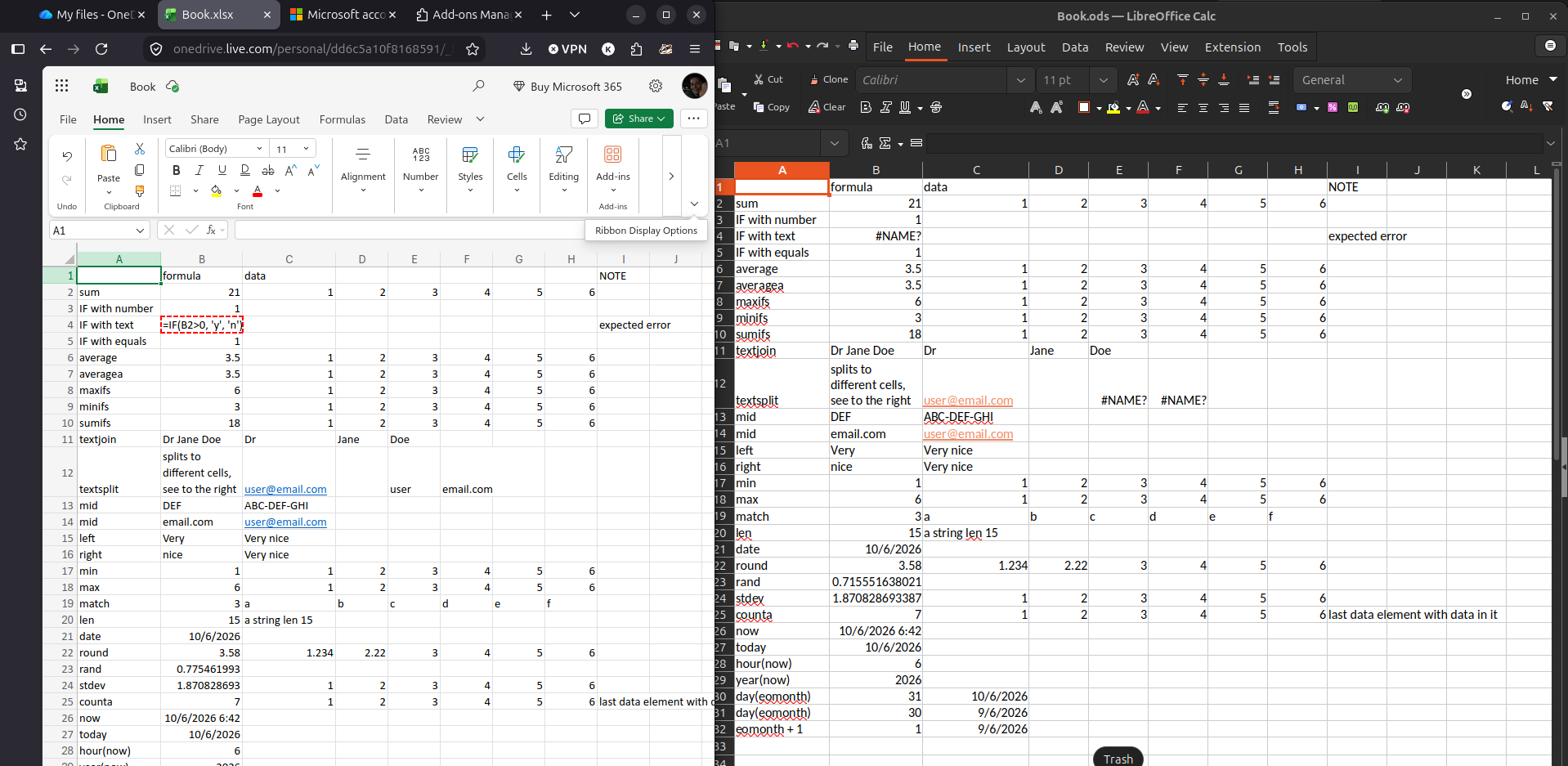
I ran a comprehensive test of 20+ common Excel formulas by creating a spreadsheet in Microsoft Excel online, then opening that same file in LibreOffice Calc to see if the formulas WORK and if they TRANSFER.
We get both! Except one formula: TEXTSPLIT.
If you're using the ODS (open document standard) file format, TEXTSPLIT won't transfer and it's not available.
The LibreOffice documentation makes it sound like it might be available if the file is Excel format, but I wasn't able to get TEXTSPLIT to work if I worked in LibreOffice with an Excel xlsx file format either.
See below for a summary table of what worked and what didn't.
| Formula Category | Excel Formula | Works in LibreOffice Calc? | Notes |
|---|---|---|---|
| Math & Stats | SUM, AVERAGE, MAX, MIN | ✅ Yes | Identical results |
| Conditional | IF, MAXIFS, MINIFS, SUMIFS | ✅ Yes | Including complex conditional functions |
| Text | TEXTJOIN, MID, LEFT, RIGHT, LEN | ✅ Yes | All text manipulation works |
| Text Splitting | TEXTSPLIT | ❌ No | Returns #NAME? - not yet supported |
| Lookup | MATCH, VLOOKUP | ✅ Yes | Works as expected |
| Date & Time | DATE, TODAY, NOW, YEAR, MONTH, DAY, EOMONTH, HOUR | ✅ Yes | All date functions work perfectly |
| Random | RAND | ✅ Yes | Generates random numbers |
| Statistical | STDEV, COUNTA | ✅ Yes | Statistical functions intact |
| Advanced | Macros/VBA | ⚠️ Untested | Needs separate investigation |
Formulas in spreadsheets
I use spreadsheets for budgeting and tracking and various other things, but I know others who need more from their spreadsheets, like lots of formulas and reliability. So I wanted to double check how well the formulas transfer. Almost all the ones I checked do! There was one single formula that didn't.
The one caveat I'll give is that I haven't tested macros.
Most formulas transfered flawlessly - IF, SUM, AVERAGE, MAXIFS, MINIFS, SUMIFS, TEXTJOIN, MID, LEFT, RIGHT, MIN, MAX, MATCH, LEN, DATE, ROUND, STDEV, COUNTA, NOW, TODAY, HOUR, YEAR, DAY, EOMONTH, RAND all produce identical results between Excel and LibreOffice Calc.
Conclusion
As you can see in the comparison image, Excel and LibreOffice Calc are very similar. A funny example of this is I helped my partner with something this morning, and I got on his case for using Excel, "Why aren't you in Libre Office? What is this garbage??" But it wasn't excel he had open, it was Calc! His screen is bigger, so the ribbon is also bigger.
You can set up the ribbon-style navigation that you might be used to in LibreOffice tools. Check out my post showing how
LibreOffice is free and open source. So this saves money over subscriptions for a product that looks and behaves like what you're familiar with. If you pair LibreOffice with the right Linux An alternative to Windows or MacOS on computers. distro Bundles the Linux kernel with other software components for a complete operating system , then you can have the peace of mind that someone else isn't looking over your shoulder spying on your files.
Related Posts
LibreOffice Is the Free, Private Office Suite You Should Be Using Instead of Microsoft 365
LibreOffice is a free and open source office suite that replaces Word, Excel, and PowerPoint without subscriptions or data harvesting. Learn how to get started and customize it.
How to Install and Set Up LibreOffice (Free Office Suite)
Learn how to install LibreOffice on Linux, Windows, and Mac. Perfect for non-technical users who want free, privacy-respecting office software that works for everyday tasks.
How to Automatically Save Version History in LibreOffice on Linux
Discover how to enable automatic version history in LibreOffice Writer on Linux by connecting Google Drive via GNOME Online Accounts. A practical guide for avoiding file loss and managing drafts without complex setups.

About Katie B
I'm a mom and a programmer in the mid-Atlantic region of the USA. I like reading, games, hiking.
📬 Join the Newsletter
Get thoughtful writing and practical tips delivered to your inbox. No spam, just meaningful content. Make sure to check your e-mail (and maybe your spam/junk folder) for an e-mail to confirm your subscription!
Frequently asked questions
Do Excel formulas work in LibreOffice Calc?
Most Excel formulas work identically in LibreOffice Calc. In my testing, functions like SUM, AVERAGE, SUMIFS, TEXTJOIN, and date calculations produced exact same results. A few newer features like TEXTSPLIT may show #NAME? errors as they aren't yet implemented. At least not in the version I'm using 24.2.7.2 (X86_64)
Can I open and share .xlsx files with LibreOffice Calc?
Yes. LibreOffice can open and save Microsoft Excel .xlsx files. You can set it to default to save in Excel format by default via Tools > Options > Load/Save > General, making file sharing seamless with Excel users.
What's the difference between LibreOffice Calc and Microsoft Excel pricing?
LibreOffice Calc is completely free with no subscriptions. Microsoft 365 Personal costs approximately $99.99 per year in 2026. Over five years, switching to LibreOffice saves nearly $500.
Will my macros and advanced Excel features work in LibreOffice?
Basic to intermediate formulas work perfectly. Complex VBA macros may require modifications as LibreOffice uses different macro language. Most everyday users won't need macros for budgeting, tracking, and data organization tasks.