 The Crosswalk
Connect to the Cloud Seamlessly on Linux
Save money and cut the friction: A mom’s guide to seamless Google Drive, OneDrive, and Dropbox on Linux
I'm all about meeting people where they are, and some people use cloud storage, like Google Drive or Microsoft OneDrive. It takes time to migrate away from these if you don't like them scanning your stuff or training their AI on it.
You can still stay connected to these files on Linux An alternative to Windows or MacOS on computers. , and if you're using LibreOffice on Windows or Mac instead, you'll still be able to connect there too.
These aren't "perfect" solutions, but since I've migrated away from the big tech cloud for the most part, these work for me. I want to share these options with you in case they help your family too.
⚠️ WARNING: If you do these set ups I talk about, there's something you need to know about file recovery. For most of these, if you delete a cloud file from your local file explorer on your computer, it's gone. Like, gone gone and you can't get it back.
LibreOffice or other programs and cloud storage
If you need to save your files to the cloud or read files from the cloud, you have a few options. Of course, there's the manual download/upload option from the browser Lets you visit pages on the internet, examples are Safari, Edge, Firefox, or Brave. , but that's not very compelling. Some people have time for that, but for a lot of people, that adds unnecessary steps and frustration.
Here, we'll talk about how to connect to your cloud storage from Linux An alternative to Windows or MacOS on computers. in ways that make saving files seamless.
Terminal a text-based tool where you navigate your system and run commands by typing instead of clicking in a user interface solutions
There are also CLI clients, which means you use the
terminal
a text-based tool where you navigate your system and run commands by typing instead of clicking in a user interface
to do this. onedrive is one. Proton offers a CLI on
Linux
An alternative to Windows or MacOS on computers.
for their cloud storage. There is at least one for Apple iCloud.
I do have a section (about the tool called rclone) with some terminal a text-based tool where you navigate your system and run commands by typing instead of clicking in a user interface in it. If someone comes across this post who is struggling to set that up, I had a couple of suggestions that can help until I get it its own dedicated post.
However, I am going to stick with point-and-click solutions for you in this post aside from that. I want to make sure to cover those solutions on The Crosswalk before I start writing about how to use the terminal a text-based tool where you navigate your system and run commands by typing instead of clicking in a user interface . Just know it's available for now.
GNOME Online Accounts
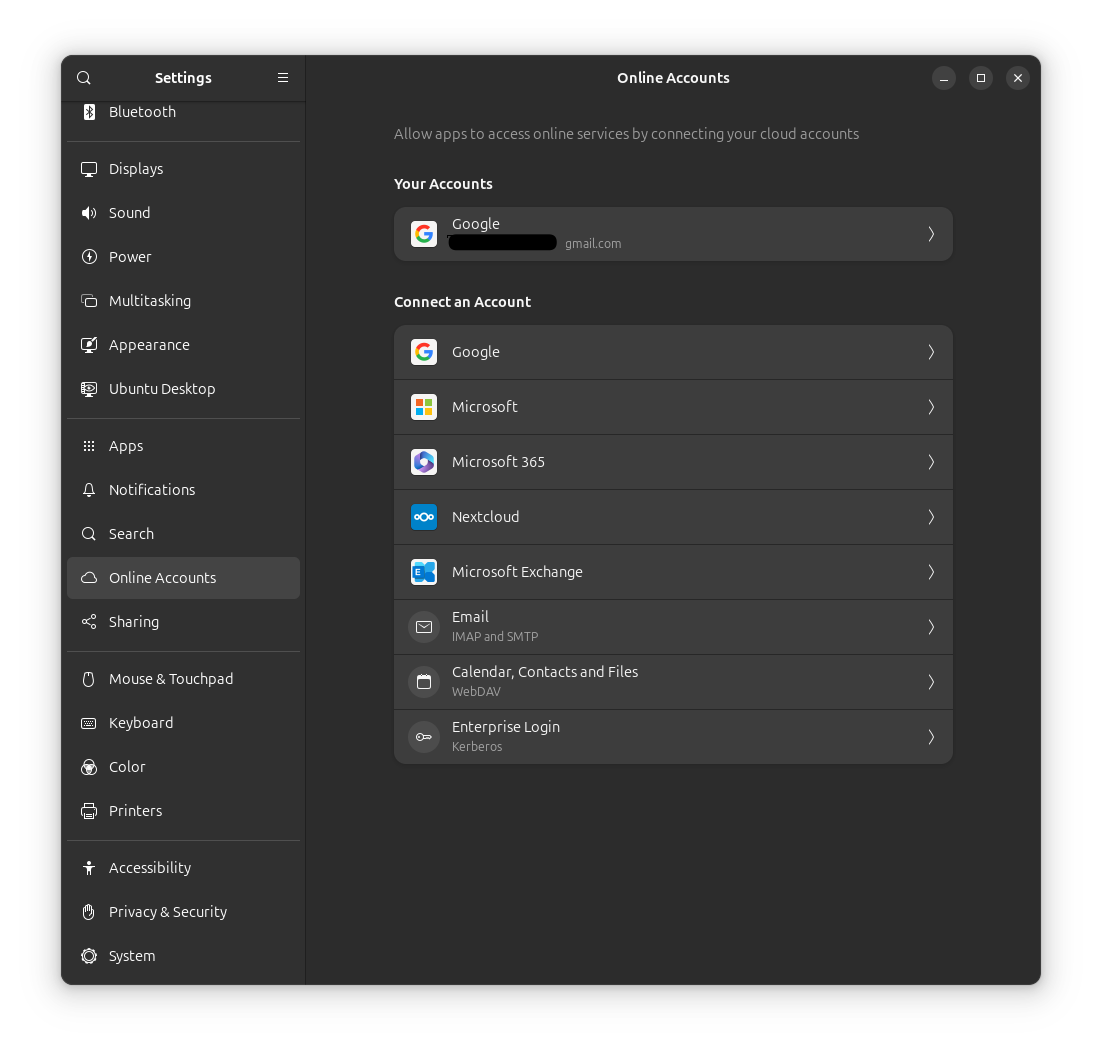
Go to your Settings if you're using GNOME, and on the left hand menu, you'll see something called Online Accounts. This is where you can
log
log files in a computer are notes where programs record events, messages, warnings, and errors so you can see what happened and when
in to your cloud provider and connect e-mail, calendars, or your files to your local desktop. It's very handy if you use LibreOffice (Microsoft Office alternative) for writing documents, doing spreadsheets, creating presentation slides, making pdfs, or whatever else.
Google Drive
Google in Gnome Online Accounts to view in Files (the file explorer)
I use Zorin 18 and I connected my Google Drive to my file system for this post. I also did it in Ubuntu. It allows me to create and save files on my computer that are saved in Google Drive.
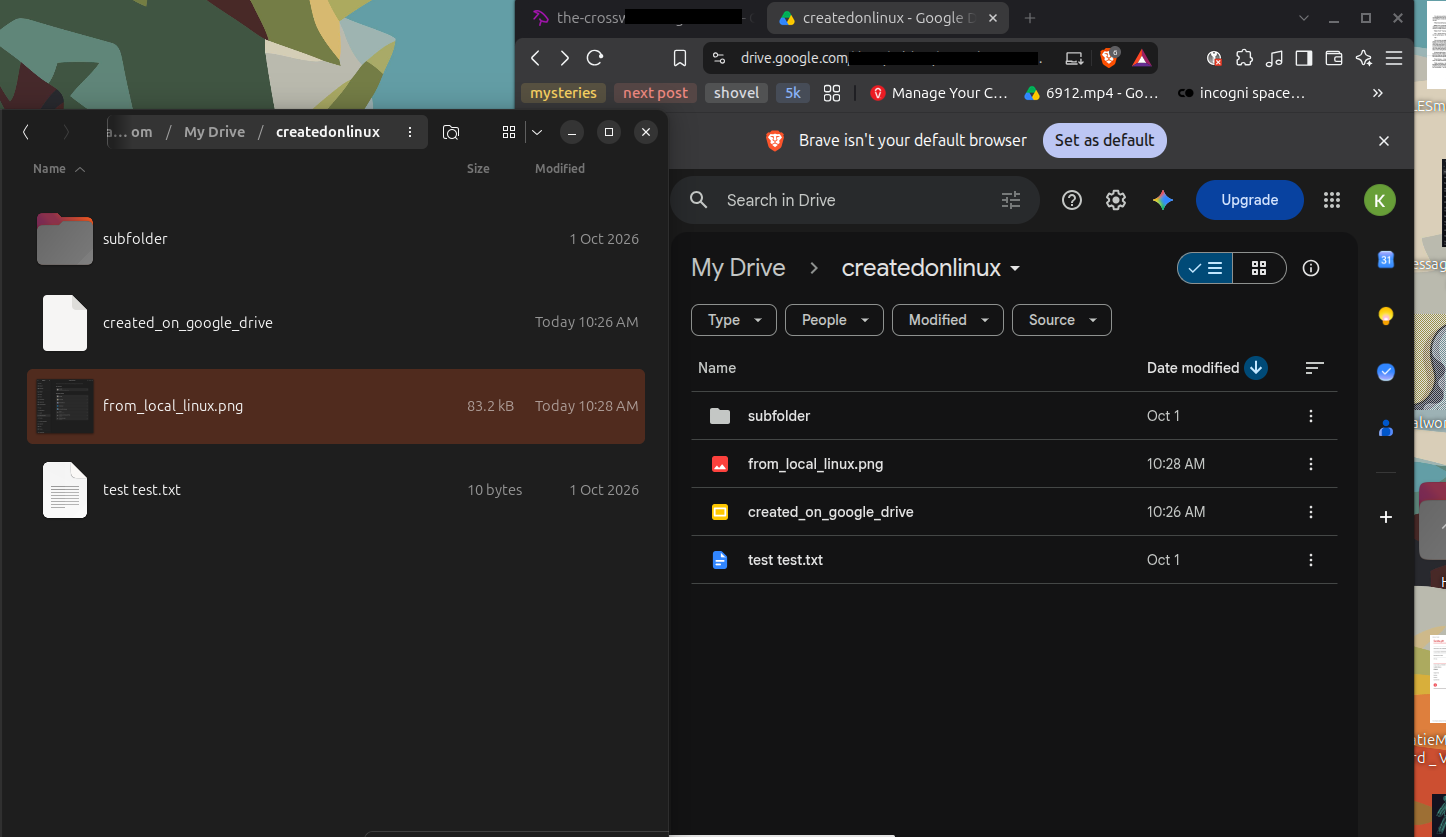
If you create a document or spreadsheet file on Google Drive, it'll be in their format where you can't open it locally. Google allows you to export files as various formats, so you can do that for files created in Google Drive to have something that LibreOffice can open.
Microsoft OneDrive
Not all services play nicely with GNOME Online Accounts. Microsoft OneDrive is one example. It used to work fine, but now it doesn't seem to work in Zorin or Ubuntu, and other people have reported the same thing. Permissions show correctly in your account, but the connection never completes. For OneDrive, you'll need a dedicated tool.
I'd still encourage you to try this option, because I didn't find any other point-and-click options.
CLI tools - onedrive
I used one called onedriver when I migrated my files off OneDrive because of the limitations Microsoft places on
browser
Lets you visit pages on the internet, examples are Safari, Edge, Firefox, or Brave.
downloads. One thing to see is their tests are failing, which doesn't mean the program is bad or doesn't work. They just likely need to update their tests. However, I might steer you toward onedrive, which is what I have on the computer of someone I helped.
Its set up is not as simple as rclone, though, if you're looking for least amount of terminal a text-based tool where you navigate your system and run commands by typing instead of clicking in a user interface .
rclone - accompanying video is coming for this
The closest thing to a point-and-click solution I found for OneDrive is rclone. It involves a little bit of terminal a text-based tool where you navigate your system and run commands by typing instead of clicking in a user interface right now because the " GUI GUI (pronounced 'gooey') stands for Graphical User Interface. Visual interaction with a program instead of just typing commands. ," the point-and-click tool that you access from the browser Lets you visit pages on the internet, examples are Safari, Edge, Firefox, or Brave. , is still in early stages.
It needs its own dedicated post with instructions and an accompanying video so I'll be working on that. It looks promising as a way to schedule backups to the cloud.
This tool can handle a ton of different cloud connections (Google Drive, Dropbox, OneDrive, etc). Dropbox is a sponsor of them. rclone's documentation says to NOT download rclone from the package managers, because there are known issues with them. That means don't go to "Software" or to the "App Center" in your Linux An alternative to Windows or MacOS on computers. distro Bundles the Linux kernel with other software components for a complete operating system .
We're going to download it from the website.
In Zorin and Ubuntu, this means you download their .deb file. If you double click a .deb file in the file explorer (GNOME Files), it should open in the app center. This is ok. When you click install and then it's done, you'll wonder if anything happened, but it's likely there. This is where the
terminal
a text-based tool where you navigate your system and run commands by typing instead of clicking in a user interface
comes in.
If you're stuck with rclone - a little advice
I wanted to offer some help if someone comes across this and is stuck. I'm working on the video and post, but hopefully this is enough for some:
I set up by going to the
terminal
a text-based tool where you navigate your system and run commands by typing instead of clicking in a user interface
, typing rclone
gui
GUI (pronounced 'gooey') stands for Graphical User Interface. Visual interaction with a program instead of just typing commands.
and the https:// that appears opens automatically for me in my
browser
Lets you visit pages on the internet, examples are Safari, Edge, Firefox, or Brave.
. If not, just copy and paste it.
When I did "create remote," the rclone
gui
GUI (pronounced 'gooey') stands for Graphical User Interface. Visual interaction with a program instead of just typing commands.
didn't ask me which drive or properly attribute the "drive_type" that I selected.
I had to go to the
terminal
a text-based tool where you navigate your system and run commands by typing instead of clicking in a user interface
, type rclone config and then select "e) Edit existing remote" and it eventually asks you to enter the "drive_type" and select the "drive_id" which will be something like "OneDrive (Personal)" if it's just a one person account.
The config menus are really long if you don't log log files in a computer are notes where programs record events, messages, warnings, and errors so you can see what happened and when in to Microsoft first via the gui GUI (pronounced 'gooey') stands for Graphical User Interface. Visual interaction with a program instead of just typing commands. . Edit existing is a much shorter menu.
After your remote connects, you'll be able to see and use it in Explorer. To be able to use files from the cloud in LibreOffice and other programs, you'll need to mount it to your file system. In the GUI GUI (pronounced 'gooey') stands for Graphical User Interface. Visual interaction with a program instead of just typing commands. , you can select "create Mount."
The folder you point to to mount needs to already exist. Like /home/katie/OneDrive.
I had to increase the VFS cache max size value. I don't have anything on OneDrive and I'm not dealing with big files, so I picked 1G as my value.
Make sure to select VFS_cache_mode to something like "full" and you may or may not need to alter the "max age" value. I put 24h, but it can be longer or shorter.
Dropbox
Dropbox's website shows they have a client for working with your files on Linux. I don't have an account so I didn't test this one.
WebDAV
The GNOME Online Accounts has an option for something called WebDAV It seems the official site hasn't been updated in a while. That doesn't mean it's not ok to use this protocol. There are cloud storage services that allow you to use this protocol to connect to your cloud files, but I don't want to comment beyond that since I don't have direct experience.
This protocol is also what you might use if you self-host. Self-hosting is like having your own cloud in your house. Your imagination is the limit if you're able to self-host!
Conclusion
Moving to Linux An alternative to Windows or MacOS on computers. or using LibreOffice don't have to mean that you're without cloud storage integration. For any of the popular services, I know you can manually upload and download via the browser Lets you visit pages on the internet, examples are Safari, Edge, Firefox, or Brave. . I assume you can do it with the smaller ones.
However, Google Drive has an easy connection in GNOME Online Accounts so you can use Files and other tools seamlessly with cloud storage there.
Microsoft OneDrive has an easy tool that works with your Files, but you have to download it from the
terminal
a text-based tool where you navigate your system and run commands by typing instead of clicking in a user interface
. rclone is another option but it's more involved setup.
DropBox seems to have a tool you can download from their website.
There are also terminal a text-based tool where you navigate your system and run commands by typing instead of clicking in a user interface tools if you're comfortable with that.
Caution about deleting files
"With great power comes great responsibility," so be cautious about file deletes. In most of these tools, the deletes are instant and permanent. This means you can't recover something in the cloud or your local trash bin if you delete it on the PC when you're accessing cloud files via these types of connections.
So if you want convenience, less friction, more control, and cost savings, these options are for you. However, if you are afraid you'll delete something you can't recover, you might want to reserve these options only for certain occasions or skip it in favor of manually uploading and downloading files.
This is a way to take back control where you can if it works for you. Every cloud service you connect to on your terms is one less platform making decisions for you.
Related Posts
What Is GNOME? A Beginner-Friendly Guide to Linux's Most Popular Desktop
Learn what GNOME is, how it compares to Windows and macOS, and why it's perfect for privacy-conscious beginners switching to Linux. Free, customizable, and surprisingly familiar.
Just How Different Are Our Online Experiences?
A reflection on how algorithms in streaming and social media create isolated digital worlds, reducing shared cultural experiences.
How to Automatically Save Version History in LibreOffice on Linux
Discover how to enable automatic version history in LibreOffice Writer on Linux by connecting Google Drive via GNOME Online Accounts. A practical guide for avoiding file loss and managing drafts without complex setups.

About Katie B
I'm a mom and a programmer in the mid-Atlantic region of the USA. I like reading, games, hiking.
📬 Join the Newsletter
Get thoughtful writing and practical tips delivered to your inbox. No spam, just meaningful content. Make sure to check your e-mail (and maybe your spam/junk folder) for an e-mail to confirm your subscription!
Frequently asked questions
Can I access my Google Drive files on Linux without uploading and downloading manually?
Yes. Using GNOME Online Accounts in settings, you can connect your Google Drive directly to your file explorer (Files) for seamless, point-and-click access just like a local folder.
Does OneDrive work with GNOME Online Accounts on Linux?
Unfortunately, no. While it used to work, OneDrive connections may fail to complete in modern versions of Ubuntu and Zorin. You will need to use a dedicated tool like `onedrive` installed via terminal for a GUI experience.
Is it safe to delete files while they are connected to the cloud on Linux?
Not exactly. Most of these integration tools sync deletions instantly and permanently. If you delete a file in your file explorer, it is gone from the cloud immediately with no trash bin to recover it from. It also doesn't go to your local trash bin.