 The Crosswalk
VLC's Playlist Feature: The Real Hidden Superpower
The one feature that makes every other VLC feature better
You might spot VLC out in the wild. It's been around a long time. I even saw a photo from the recent NASA Artemis mission (orbiting the Moon) where a crew member was holding a laptop running VLC! I think it was astronaut Christina Koch (my younger son knows her as the "Hey Ho to Mars We'll Go" lady), but I'm not sure if the image was real. I'd like to think so.
Where do astronauts hang out?
... the spacebar
badum-tss
VLC and streaming
You may know you can use VLC to play video and audio files locally, but did you know VLC can stream content from around the entire world? Check out my deep dive on VLC's streaming capabilities for the full tour.
A lot of articles and videos claim to reveal "hidden features" or "secrets," but most are just menu items or buried just a layer deep in settings. I haven't seen anyone point out the thing that enhances all the other features: the playlist.
Why the playlist is a big deal
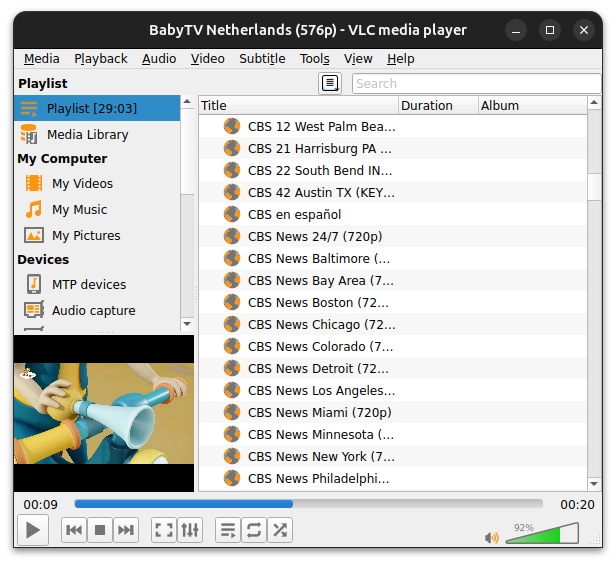
In the menu, you can view a playlist of any video stream, audio file, or podcast show. This shows you all available channels and episodes at once. You can click from one to another.
Save your streams as a playlist
When you close VLC, you have to enter the stream URL again, unless you save it as a playlist! In the older version of VLC, you'll see the below, where there's a podcast manager. You don't have to save it as a playlist, but with radio and video streams, you do. Another note is that currently, the most recent version of VLC doesn't have this podcast manager that I can find.
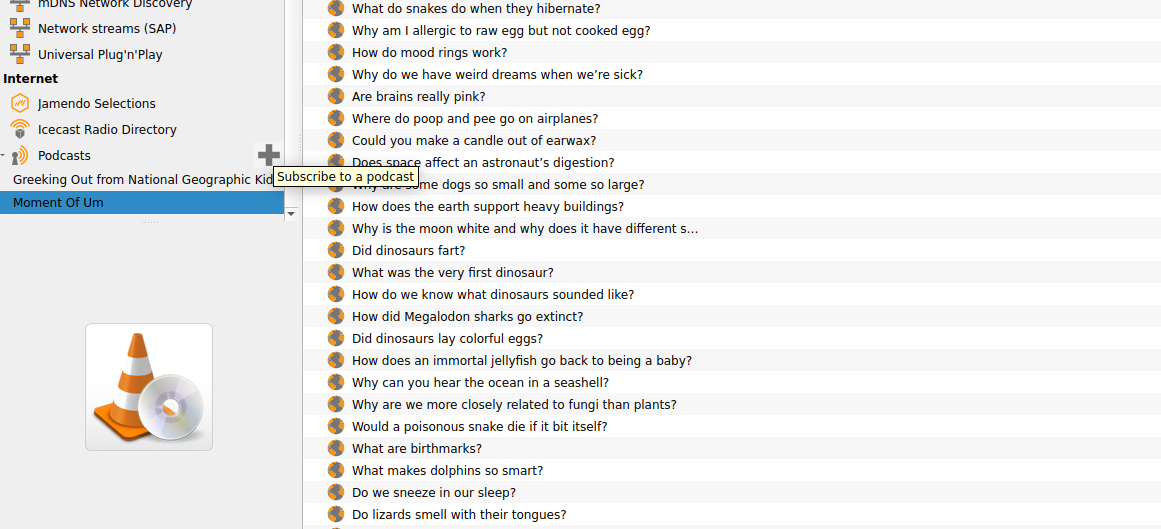
You can see the user guide here on VLC's VideoLAN website.
Conclusion
The playlist section makes VLC an entertainment command center. And when you save the playlist to your computer, you can come back to it again and again without finding the streaming url. There are no logins required to access free, legal, movies, shows, and radio. And it's ready every time you launch VLC.
Related Posts
Open Source Hero: How VLC Saves Money Without Big Tech Hassle
Discover why VLC Media Player is trusted by millions worldwide, with no ads, no tracking, and no subscriptions. Learn how to unlock free streaming from around the world, listen to radio stations, and watch podcasts all in one place without paying big tech companies.
Just How Different Are Our Online Experiences?
A reflection on how algorithms in streaming and social media create isolated digital worlds, reducing shared cultural experiences.
Accused of Using AI? How to Prove You Wrote Your Own Paper
If a professor accuses you of using AI, don't panic. This post offers easy ways to store evidence of your writing AND what I would do if I was accused of using AI in high school or college.

About Katie B
I'm a mom and a programmer in the mid-Atlantic region of the USA. I like reading, games, hiking.
📬 Join the Newsletter
Get thoughtful writing and practical tips delivered to your inbox. No spam, just meaningful content. Make sure to check your e-mail (and maybe your spam/junk folder) for an e-mail to confirm your subscription!
Frequently asked questions
What does the VLC playlist feature do?
The playlist view in VLC shows you all available channels and episodes from a stream or podcast feed at once, letting you browse and switch between them without re-entering URLs each time.
Can I save my VLC playlist so I don't lose it?
Yes. You can save a playlist file to your computer and reopen it anytime. Your saved streams will be there waiting next time. No logins or accounts required.
Does the newest version of VLC have the podcast manager?
As of this writing, the most recent 'edge' version of VLC does not appear to have the podcast manager that existed in older versions. The stable release still includes it. For me it's a tough decision which version to use. I love the podcast manager feature in the older version of VLC, but I really like the radio discovery (across the whole world!) in the edge version.
Is VLC's playlist feature free?
Yes. VLC is completely free and open source, developed by the nonprofit VideoLAN organization. The playlist feature is built in—no upsell, no premium tier.